SnapMacros by EmbraceHealth.ai
I Know Tracking Works. I Just Can't Keep Doing This Every Damn Meal.
I do not want to weigh every ingredient.
I do not want to search a food database for 10 minutes.
I do not want to rebuild the same recipe again.
I do not want to guess what is hiding in restaurant food.
And I do not want to take a photo, get a number, and wonder whether the AI made half of it up.
Take the picture.
Fix what matters.
Decide what to eat next.
SnapMacros is designed to make food tracking practical enough to keep using.
We think this is
2 tamales covered in green chili pork sauce, with a side of rice
Nothing is logged until you choose.
Illustration of the in-app flow, not a screenshot.
The problem is not knowing that nutrition matters
Food Tracking Turns Into a Second Job.
Breakfast is easy.
Then lunch is homemade.
Dinner is takeout.
Someone used more oil than expected.
The restaurant does not publish nutrition.
The database has six versions of the same meal.
You forgot to weigh something.
Now you are standing in the kitchen doing math instead of eating.
That is where people quit. Not because they suddenly forgot their goals.
Because tracking became too much work.
Most food apps make you choose between two bad options.
Option 1
Detailed, but tedious.
Search. Measure. Weigh. Build. Correct. Repeat.
Option 2
Fast, but hard to trust.
Take a picture. Get a number. Hope the camera correctly guessed the oil, the sauce, the portion, the ingredients, the cooking method and the serving size.
Perfect is useless if you quit.
Fast is useless if you do not trust it.
SnapMacros is built for the middle.
The better tradeoff
Fast Enough to Use. Honest Enough to Question Itself.
A food photo can tell you a lot. But not everything.
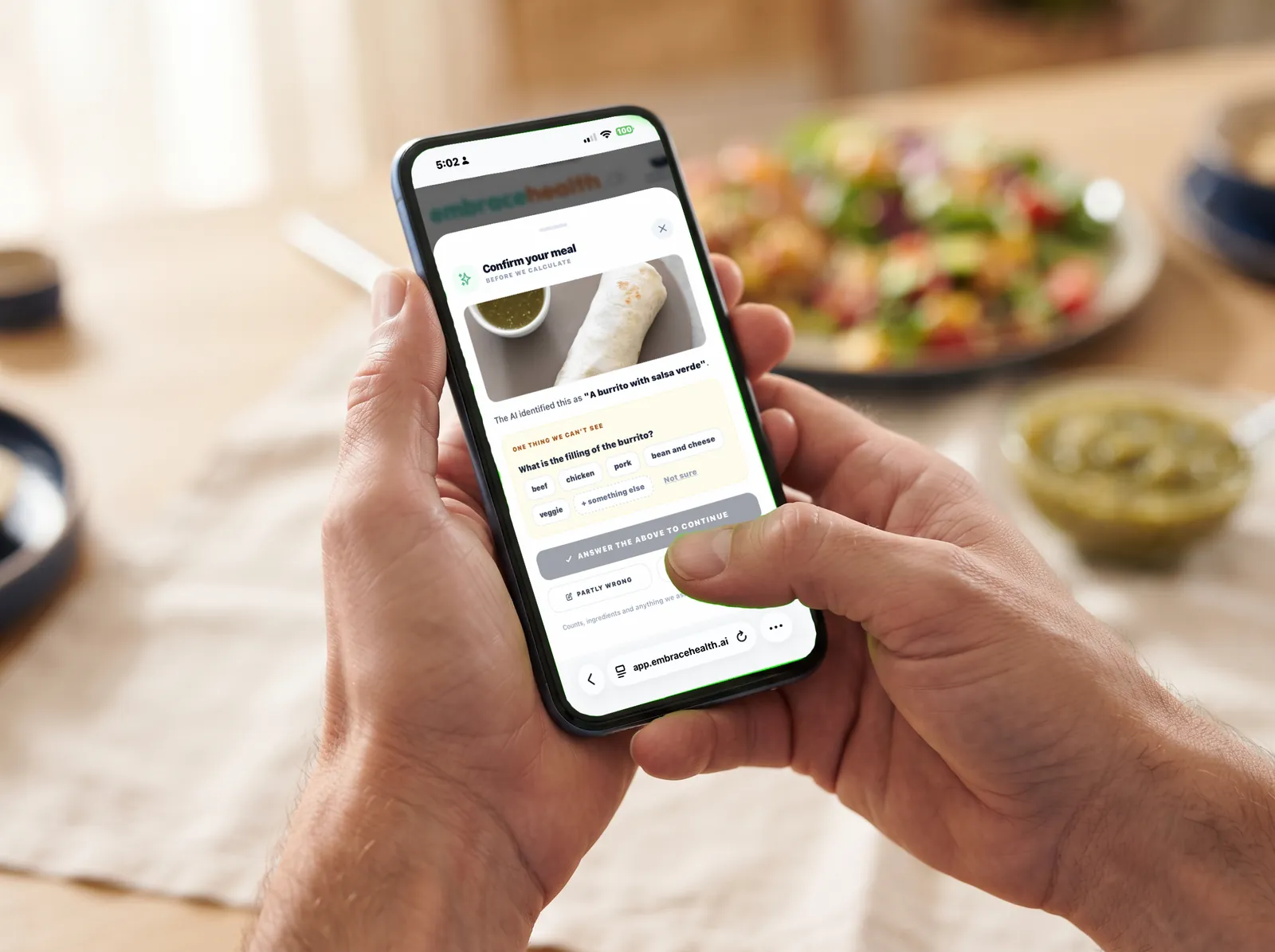
A camera may recognize
Chicken, rice, broccoli, avocado, pasta, fruit, bread.
But it may not know
How much oil was used. What is inside the sauce. What filling is inside a burrito. What the recipe contains.
That is why SnapMacros does not pretend a single photo gives you perfect nutrition data. It identifies the dish, lets you correct it, and only then works out the macros — from the confirmed name, never from the image directly. That separation is what stops a misread dish being logged with confident wrong numbers.
And when a photo really is too unclear, it says so rather than guessing, and offers to let you type it in.
Estimate what looks clear.
Verify what actually matters.
Move on.
How SnapMacros works
See → Verify → Understand → Decide → Shop → Eat → Learn
The goal is not to create another food log. The goal is to move from
"What did I eat?" to "What should I do next?"
- 1. See
Start With the Fastest Input.
Take a photo. Upload one. Scan a barcode. Speak it. Type it. Scan the restaurant menu. Log it straight from your meal plan, from a batch you cooked, or from something in your pantry eaten as-is.
Log without doing paperwork.
- 2. Verify
Fix the Parts a Camera Cannot Know.
If the meal looks right, keep moving. If something important is hidden — like what is inside a tamale — SnapMacros asks one useful question. Most meals get none. Two is the ceiling.
Correct what matters. Ignore what does not.
- 3. Understand
Know Roughly Where You Stand.
Calories, protein, carbs and fat — plus sugar, fibre, sodium and micronutrients where the source supplies them. Your day so far against your goals, net of active calories burned if you connect a health device.
The numbers are not the final product. They are context.
- 4. Decide
Figure Out What Comes Next.
Photograph what you have and get recipes you can actually cook. Generate a meal plan. Ask the coach which dish to order. Compare packaged foods side by side.
Do not just show me the gap. Help me close it.
- 5. Shop
Turn the Decision Into a Grocery Action.
Your meal plan, your pantry and your grocery list talk to each other. See what next week needs that you do not have, then send the list to Instacart or AmazonFresh.
"Here is what you already have and what you still need."
- 6. Eat
Log What Actually Happened.
Plans change. Log what you ate, mark a planned meal as skipped, or fix an entry after the fact — rename it, change the portion, adjust the time.
Not what the meal plan hoped you would eat.
- 7. Learn
Stop Starting From Zero Every Day.
Saved recipes. Meal, scan and dining history. Ingredient matches remembered per kitchen. How many plates a dish usually makes. Fewer questions about dishes you have told it are not from your kitchen.
The goal is less repeated work.
Start with the plate
Take the Picture. Let SnapMacros Do the First Pass.
A photo is the fastest way to start. SnapMacros identifies the dish, then hands it back to you. Every identification lands on the same screen: Looks right, Partly wrong, or Not even close. Nothing is logged until you pick one.
Correct the parts, not the whole sentence.
Partly wrong breaks the dish into pieces you can actually change: a stepper for things you can count (2 tamales → 3), a remove toggle for the side you didn't eat, and option pills for what the camera can't see. Anything it missed entirely, type it or say it.
A camera should know when it doesn't know.
SnapMacros only asks when there is no sensible default and the answer really moves the numbers — the filling of a tamale, for instance. Where a default is defensible, it assumes, and tells you so with its reason. Most meals get zero questions. One is normal for wrapped food. Two is the hard ceiling.
See exactly where every detail came from.
Fast first.
Precise where it matters.
Confirm
2 tamales covered in green chili pork sauce, with a side of rice
Illustration of the in-app flow, not a screenshot.
Estimates, not lab measurements. Food-photo analysis and the numbers that come from it are approximations. A photo has no scale, so SnapMacros does not read portion size from the image — you set counts and portions yourself.
Not every meal needs a photo
Log It the Way That Is Fastest.
Sometimes the package is right in front of you — scan it. Sometimes you know exactly what you ate — say it. Real life does not happen in one format, so every log records where it came from and the history can tell them apart.
Photograph it
In-app camera
Upload a photo
From your library
Type it
"Turkey sandwich, apple, coffee."
Say it
Mic wherever typing is
Scan the barcode
Packaged food
Pick from a menu
Photo or QR code
From your plan
Log the planned meal
From a batch
A plate of what you cooked
From your pantry
One item, eaten as-is
Use the input that takes the least effort.
What you get back
Calories, protein, carbs and fat — and where the source supplies them, sugar, fibre, sodium and micronutrients like potassium, magnesium, vitamin D and calcium.
Fix it after the fact
- Rename it — and recompute for the new name
- Change the portion: ½, 1, 1½, 2 — every macro scales
- Edit calories and macros directly
- Change the time, or delete the entry
Your day, honestly
Calories and protein totalled against your goals, net of active calories burned if a health device is connected. Skipped a planned meal? Log it as skipped so the plan reflects what actually happened — without inventing calories.
The useful question
Stop Telling Me What I Already Ate.
Help Me Decide What Comes Next.
You already know what happened at lunch. What matters now is dinner. Most trackers stop at "you have 42 grams of protein left." Fine. Now what?
Point the camera at the fridge.
Pantry Chef turns what it sees into complete recipes with quantities, steps and macros per serving.
See how →Eating outAsk “Which should I order?”
Scan the menu, then let the coach weigh the dishes against your goals and conditions in conversation.
See how →Plan aheadGenerate the week.
Build a complete day or week of meals from your profile, instead of staring at a blank grid.
See how →In the aisleCompare up to three.
Scan one, scan another, and see the highest and lowest of every number side by side — no verdicts.
See how →Do not just show me the gap. Help me close it.
Help Me Pick DinnerUse what you already bought
Before You Buy More Food, Check What Is Already in the Kitchen.
Meal apps are great at suggesting ingredients you do not have. Pantry Chef works the other way. Point the camera at an open fridge, a shelf, or ingredients on the counter, and get complete recipes built from what it sees.
The goal is getting dinner on the table.
What comes back
- Full recipes with ingredients and quantities
- Step-by-step instructions
- Macros per serving
- The kitchen tools you will need
- A serving count — so the pantry knows what each plate used when you cook it
Smarter with My Pantry. Fine without it.
Pantry Chef never needs an inventory — the photo alone is enough. If you keep one, it also knows what is in stock. Items running low or not checked in a month can be used, but never become the main ingredient unless the photo shows them. Anything near its use-by date is flagged USE SOON, and recipes that use it are preferred.
Then do something with it
Save it to your recipe library, plan it into a meal slot, cook it through Cook Mode, or log it directly. Previous Pantry Chef scans and the recipes they produced are kept in your scan history. And your allergens are enforced on the server: a recipe containing one is never returned.
My Pantry
A Real Inventory. Not a Spreadsheet You Have to Babysit.
My Pantry holds exact quantities — grams, millilitres or units — not a vague plenty / low / out flag. There is no setup screen: your kitchen is created the first time you use it, and everything else in SnapMacros keeps working with an empty pantry.
One item by photo
Name, brand and size — plus net quantity and servings when the label is visible.
A whole shelf
One photo of a shelf or fridge returns every item it detects, confirmed in a single pass.
Scan barcode
Looks the product up and fills in package size and serving data.
Type it in
Manual entry, whenever that is quicker.
A shelf scan that saves four of six says "Added 4 of 6" and offers to retry only the two that failed.
Rice
about ½ · Not checked in 12 days. Still about ½?
Twelve fill positions instead of a slider.
Illustration of the in-app flow, not a screenshot.
- Counted items — eggs, cans, yoghurt cups — take a count, not a fill level.
- Opaque containers aren't guessed at. If the camera can't see inside the jar, you pick the level.
- Estimated sizes are labelled Estimated. Flip it over — photograph the label or scan the barcode — to replace the guess with a fact.
- Re-scanning never duplicates. Choose Update amount, Bought a new one or Separate item.
- Every change is a ledger entry — intake, restock, cooking, waste, corrections — and each item's full history is viewable.
- Label-aware units. "¼ tsp (1.2 g)" on the label lets a recipe's teaspoon convert to grams for that brand. Without that, weight-to-volume conversion is refused, not fudged.
Keeping the count honest
SnapMacros assumes its own numbers drift — unlogged cooking, kids, spills. Every item shows how sure it is: sure probably check. That describes our number, never whether food is safe to eat. "Still have it?" is asked in context — on the row, before you cook — not as a chore list.
Running low adds itself
When an item drops to its threshold (25% of a package by default, adjustable per item), it lands on your grocery list — once, not in a pile. Check it off in the store and SnapMacros asks Back in your pantry? Salt, spices and oil can be marked as staples so a pinch per recipe doesn't drain a notional jar.
Use-by dates and a weekly check-in
Set a use-by date (or +3 days / +1 week / +2 weeks) and see a Use soon strip at the top of My Pantry. When a few items have gone uncertain, a quick check-in — about a minute — offers to sort them out. Snap a shelf to pre-answer what the photo recognises.
Correcting the count is cheaper than the error.
Where tracking usually falls apart
Homemade Food Should Not Require a Laboratory.
Cooking at home should be the easy part. But food tracking can make it harder.
Weigh the ingredients.
Build the recipe.
Divide the servings.
Work out what the leftovers were.
Repeat it next week.
SnapMacros separates two things most apps blur together: food leaving the pantry and food entering a person. Cook lasagna for six, take the ingredients out once, and log only your own plate.
| What happened | Pantry | Your log |
|---|---|---|
| Cooked a recipe for 6 | Deducted once | — (6 plates ready) |
| Ate a plate from the batch | — | Logged |
| Ate a pantry item as-is | Deducted | Logged |
| Ate out, or someone else cooked | — | Logged |
| Spilled or tossed | Deducted as waste | — |
Cook sheet
How many plates did it make?
- Spaghetti−400 g
- Eggs−8
- Garlic salt−19 g
Nothing is deducted until you press the button.
Before you start
You have 5 of 7. Might be short on eggs. Out of basil.
Illustration of the in-app flow, not a screenshot.
Four ways to say “I cooked”
Done cooking at the end of Cook Mode. Cooked it on any recipe card. Made it on a planned meal. Or just tell the coach, "I made lasagna for six." Every amount is shown before anything is taken out.
Leftovers, one tap each
A cooked batch becomes plates anyone in the kitchen can log with one tap, listed for ten days with their age shown plainly — "Cooked yesterday." Tossed closes the batch. Undo reverses exactly what it took.
Cook Mode and your recipe library
Save any analysed meal, Pantry Chef suggestion or menu dish. Follow it hands-free in Cook Mode with an ingredient drawer, plan it into a slot, generate a plated photo for a recipe that has none, get an AI assessment of it, or type in your own.
Home cooking should still feel like cooking.
Not accounting.
Plan it, then shop it
Turn the Decision Into a Grocery Action.
Once you know what you might eat, the next question is: do I have it? In SnapMacros, your meal plan, your pantry and your grocery list talk to each other.
Meal plans
- One-off, daily or weekly plans with Breakfast, Lunch, Dinner and Snack slots
- Drag recipes in on desktop, or tap a slot and pick on your phone
- Per slot: log it as eaten, mark it Made it (which takes the ingredients out of the pantry), log it as skipped, or remove it
- Keep several plans and switch which one is active
- Generate AI Plan builds a complete plan from your profile instead of a blank grid
Condition-aware planner
Plans built around your conditions — not a generic plan with a disclaimer.
Choose one or more medical conditions, a cuisine and a duration — a day or a week — and the plan is generated against those conditions. A conversation with the coach, or an article, can hand off straight into a plan pre-filled with what you were discussing.
Your allergens are enforced on the server during plan generation: a recipe containing one is never returned, and your allergen list is never sent to the AI model.
General wellness and food planning, not medical nutrition therapy. Talk to a qualified professional about individual dietary care.
A grocery list that already knows what you need.
- Meal Plan Importer — pull every ingredient from a plan onto the list in one pass
- Photo identification — photograph groceries or a handwritten list and the items are added
- Running low in your pantry — fills itself from pantry thresholds
- For your meal plan — what the next seven days need that your pantry doesn't have, ordered by when you need it, never listed twice
- Export to Instacart and AmazonFresh — hand the list off instead of retyping it
- Multiple named lists, with one marked Live Sync for automatic additions
- Quantities and units kept separate from the item name
"Here is what you already have and what you still need."
Grocery list
For your meal plan
Mozzarella
For Thu Lasagna, Sat Pizza · 1 package (454 g each) · have 100 g, need 500 g
Fresh basil
For Thu Lasagna · About 4 g
Garlic
For Thu Lasagna · You're out
Illustration of the in-app flow, not a screenshot.
Real life includes restaurants
Eating Out Should Not Break Your Entire Day.
Restaurant meals are hard to estimate. You may not know how much oil was used, what is in the sauce, or how the dish was prepared. SnapMacros helps without pretending those answers are exact.
The menu does real work here. "Braised short rib, polenta, gremolata" is a far better starting point than "Short Rib," so the dish's description goes along with its name. The app never guesses which dish you meant and never analyses the whole menu — you choose one, then it runs through the same confirm-and-correct screen as a photographed meal, with the same questions.
Still deciding? Ask the coach "Which should I order?" and it weighs the dishes against your goals and conditions.
Check in
A nearby-restaurant lookup logs the meal against a place. Declining location never blocks you.
Snap the dish
Photograph the plate and use the same confirm-and-correct flow as at home.
Photograph the menu
Every dish is pulled out with its description, price and section — grouped and searchable. You pick the one you ordered.
Scan the table QR
SnapMacros fetches and reads the menu directly — web pages, PDF menus (including scanned ones) and image menus.
Nothing dead-ends.
- An unreadable menu offers a closer photo of one section, or shooting the dish instead
- A failed identification falls back to the menu’s own wording, so your pick still works
- A failed macro lookup keeps your pick and offers a retry
- Restaurant meals are kept in their own dining history — including menu picks with no food photo
QR codes, handled carefully.
A QR sticker can be tampered with, so the server checks where it points before fetching, re-checks every redirect, and only ever returns parsed dish names. When a menu can't be read, you're told which kind of failure it was — a JavaScript-built page, an empty page, a damaged code, a page that wouldn't load — and only a genuinely suspicious target is flagged as one, so the real warning still means something.
QR menus are cached for seven days so the next diners at your table get theirs instantly. Cached menus store no user and no allergen flags — those are recomputed for every reader.
Given what I ate, what makes sense next?
Packaged food
Scan It in the Aisle. Grade It Two Ways.
Barcode scanning lives where you need it: a Scan tab in the camera, Scan Barcode in the mobile camera menu, and a Scan button on the grocery list — the page you actually have open in the store.
Where the data comes from
- 1. Our own catalog
- 2. USDA FoodData Central Branded Foods — 450,000+ branded and private-label products, matched on exact barcode
- 3. Open Food Facts, credited
- 4. Not found? Photograph the Nutrition Facts panel instead
A refresh never replaces better data with worse.
What a scan returns
Product name, brand, nutrition per serving and per 100 g, ingredients, declared allergens matched against your own list, and the source with its licence. One label photo reads the nutrition, the ingredient list and the "Contains / May contain" lines.
Compare up to three
Scan one, tap Add to compare, tap Scan another. The highest and lowest of each number are marked and labelled — fewest, most, least — so nothing reads as a verdict. Allergen flags carry into the comparison.
EmbraceHealth AI grades
General grade
The product judged on its own, identical for every user. A fixed A–F formula over per-100 g nutrients using published public-health bands for sugar, saturated fat and sodium — so it can be defended when a clinician asks where the numbers come from.
Personal
Your Grade
The same product judged against your conditions, medications, restrictions and goals. If your health profile changes, an older grade is flagged stale instead of shown as current — tap it to recompute.
- Scored per 100 g, never per serving — shrinking the labelled serving can’t improve a grade
- A missing nutrient is never scored as zero; a product with no usable nutrition gets no grade rather than a bad one
- Protein can’t rescue a heavily penalised product, and a nutrient in the green band costs nothing
Honest caveat: USDA Branded Foods plus Open Food Facts is strong but not complete — US store brands in particular can be missing. When a product isn't found, SnapMacros offers a label photo instead of failing.
Allergens and safety
An Allergy Isn't a Preference. SnapMacros Doesn't Treat It Like One.
Food suggestions are only useful if you can trust them. So allergen handling is built as a safety system, with the wording to match.
Enforced on the server, never in a prompt
Your allergen list is never sent to the AI. The model supplies food knowledge; the server does the matching — because an allergen is a safety rule, not something a prompt can be talked out of.
Blocked where SnapMacros suggests food
Meal plan generation and Pantry Chef never return a recipe containing one of your allergens.
Flagged everywhere else
Packaged products, pantry items and restaurant menu dishes are flagged on screen.
Three matching passes
The model’s allergen groups, a literal match on your own words (like "pineapple"), and a synonym match across the ingredient list — each catches what the others miss.
Fewer false alarms, no false all-clears
"Coconut milk" is treated as coconut, so a milk allergy stops matching while a coconut allergy still does. One obviously wrong warning teaches people to ignore the real ones.
Declared vs inferred, said out loud
If the source publishes an allergen list it’s used as declared. Otherwise allergens are inferred and labelled "found in the ingredient list."
Two warning levels
Never called “safe”
When nothing matches, the wording describes the data, not the food — and the screen says: If you have a severe allergy, check the package itself.
Failed checks are admitted
If the check couldn't run, you see: "We couldn't check this against your allergy list just now." A missing warning should never read as an all-clear.
There is no allergen screen when you log a meal, by design. Logging happens after you've eaten — a warning then helps nobody, and pretending to screen there would imply a guarantee that was never made.
Built so the absence of a warning never pretends to be an all-clear.
One kitchen, several people
Share the Pantry. Keep Your Health Data Yours.
One batch may feed you, your spouse and your kids — and anyone in the kitchen can log a plate of it in one tap. But nobody should see someone else's health data just because they share a fridge.
- Invite by an eight-character code, good for seven days and up to six people; a kitchen holds up to twelve
- Joining is never one tap — the prompt names the kitchen and says exactly what is and isn’t shared
- Bring your own pantry items with you, minus anything the household already has, so there are no duplicate jars
- Members see each other’s first names only — no emails
- Each person’s “For your meal plan” runs their own plan against the shared pantry
- Leave anytime and go back to your own kitchen
The pantry and its full history
Leftover batches
The kitchen’s running-low list
Meal logs
Allergies and health data
Each person’s own meal plan
Cooking habits
Allergies, anonymously
On a shared grocery list, an item containing anyone's allergen shows ⚠ Household allergy: peanuts — never whose. In a shared kitchen, Pantry Chef avoids everyone's allergens without naming anyone.
The owner keeps the keys
Only the owner can change the running-low destination list, household size, home location and invites, remove a member, rename the kitchen or empty the shared list — enforced on the server, not just hidden. Anyone can add and check off items.
Share the kitchen without sharing private health information.
Part of EmbraceHealth.ai
Ask Naturally. Move Toward Doing It.
SnapMacros is the food side of EmbraceHealth.ai, and its AI coach — Arnie or Karina, your choice — reads the same nutrition data the screens do: your conditions, medications, restrictions, calorie and protein goals, what you've eaten today and what you've cooked recently.
Meal Prep TV
A video feed of meal-prep content with comments, friend activity and an easy way to invite friends. Restaurant check-ins and dining activity are visible to your connections, so food has a shared side, not just private logging.
“I made lasagna for six.”
The coach offers to take what you used out of the pantry. It finds the recipe from your plan, your saved recipes or your recent meals, and opens the cook sheet with every amount shown before anything is deducted. It ignores “I made a mistake.”
“Which should I order?”
It weighs the dishes in conversation against your goals and conditions.
“Plan my week around this.”
A conversation can hand off to the condition-aware meal planner, pre-filled with the conditions you were discussing.
Food is context.
Not a separate universe.
Fair Questions.
“Why would I use this instead of MyFitnessPal?”
MyFitnessPal is a strong food tracker. SnapMacros does not need to pretend otherwise.
The difference is what happens after the log. Not just “How many calories was that?” but “What can I make?” “What should I buy?” “What should I order?”
Tracking is useful. Decision support is the next step.
“Photo logging isn’t accurate.”
Sometimes it is not. That is a fair objection. A photo cannot always reveal hidden oil, exact portions, sauces, ingredients or cooking methods.
So SnapMacros designs around it: identify what is visible, ask only where the answer matters, label assumptions and estimates as exactly that, and work out the numbers from the name you confirmed.
Confidence over fake precision.
“I’ve tried food tracking before. I always quit.”
That is exactly the problem. You probably do not need another lecture about discipline. You need less unnecessary work.
If logging takes seconds, easier. If recipes you make again are saved, easier. If restaurant menus do half the work, easier. If cooking for six only means logging your plate, easier again.
The goal is not more discipline. The goal is less friction.
“I don’t want to think about food all day.”
Neither should the product. Snap. Check. Decide. Move on.
If the product makes food feel more complicated, it missed the point.
Frequently Asked Questions
What is SnapMacros?
SnapMacros is the nutrition and food experience inside EmbraceHealth.ai. It covers meal logging by photo, voice, text, barcode and restaurant menu, plus meal plans, grocery lists, a pantry inventory, Pantry Chef recipes from what you have, saved recipes with Cook Mode, dining out and meal-prep videos.
Is SnapMacros just a calorie counter?
No. Calorie and macro estimates are part of it, but the broader goal is to move from "What did I eat?" toward "What makes sense next?" — what you can cook from your pantry, what to put on the grocery list, and what to order when you eat out.
Can SnapMacros estimate calories from a photo?
Yes. SnapMacros identifies the dish from your photo and asks you to confirm or correct it. Macros are then worked out from the confirmed name, not from the image directly, so a misread dish is not logged with confident wrong numbers. If a photo is too unclear, it says so and lets you type the meal instead.
Are the calorie estimates exact?
No. Numbers that come from a food photo are practical estimates, not laboratory measurements. SnapMacros shows where each detail came from — what you told it, what it assumed and why, and what it filled in because you were not sure — and marks those meals as estimated.
Does SnapMacros work out portion size from the photo?
No. A photo has no scale, so SnapMacros does not read portion size from the image. You can set counts with a stepper (2 tamales → 3) and change a logged meal’s portion to ½, 1, 1½ or 2, and every macro scales with it.
Why does SnapMacros sometimes ask a follow-up question?
Only when there is no sensible default and the answer materially changes the macros — like the filling of a tamale, which no camera can see. Where a default is reasonable, it assumes and tells you why. Most meals get no questions; two is the most it will ask.
Can I scan barcodes?
Yes — from the camera, the mobile camera menu or the grocery list. Products are looked up in SnapMacros’ own catalog, then USDA FoodData Central Branded Foods, then Open Food Facts. Coverage is strong but not complete, and US store brands can be missing; when a product isn’t found, you can photograph the Nutrition Facts panel instead.
Can I log food by voice or text?
Yes. You can type a meal by name or speak it — the microphone is available anywhere typing is.
Can SnapMacros help with restaurant food?
Yes. Photograph the dish, photograph the menu, or scan the table’s QR code and pick the dish you ordered; its menu description is used alongside its name. You can also ask the coach which dish to order. Restaurant portions and recipes vary, so these are estimates.
How does SnapMacros handle food allergies?
Your allergen list is matched on the server and never sent to the AI model. Meal plan generation and Pantry Chef never return a recipe containing one of your allergens; packaged products, pantry items and menu dishes are flagged. SnapMacros never calls a food "safe" — if you have a severe allergy, check the package itself.
Can I share a pantry with my household?
Yes. Invite people with a code. The pantry, leftovers and the running-low list are shared; meal logs, allergies and health data, personal meal plans and cooking habits stay private to each person. Members only see each other’s first names.
Can I use SnapMacros without counting every calorie?
Yes. Pantry Chef, meal plans and grocery lists are useful on their own, and Pantry Chef works from a photo alone — no inventory required.
Does SnapMacros connect to my fitness device?
Where a health device is connected, active calories burned are netted against what you have eaten for the day.
Is SnapMacros medical nutrition therapy?
No. SnapMacros is intended for general wellness, food planning and nutrition education. It is not a substitute for individualized medical nutrition therapy from an appropriately qualified professional.
You do not need another perfect Monday
You Need Something That Still Works on Wednesday.
When dinner gets messy.
When you are eating out.
When work gets busy.
When you do not want to weigh everything.
Take the picture.
Correct what matters.
Know roughly where you stand.
Use what you already have.
Shop when needed.
Then get on with your day.
Stop turning every meal into homework.
Start making faster food decisions.